

- Introduzione
- Nuove funzionalità di Macrium Reflect X
- Metodologia di test: come abbiamo verificato se Reflect X è davvero così valido.
- Risultati dei test: cosa abbiamo scoperto nella pratica?
- Conclusioni e raccomandazioni
- Domande frequenti
Introduzione
Nonostante l'importanza di monitorare lo stato di salute di HDD e SSD con strumenti come HDDLife e SSDlife, il backup dei dati rimane essenziale. I moderni dispositivi di archiviazione — sia HDD che SSD — sono diventati più affidabili, ma non sono immortali. Secondo le ricerche di Backblaze, il tasso di guasto annuale degli HDD è di circa l'1,7%, mentre gli SSD hanno una durata limitata dal numero di cicli di scrittura. Gli errori umani (cancellazione accidentale di file) e i guasti software rimangono le cause principali di perdita di dati. Il backup non è opzionale — è necessario, specialmente per le aziende dove la perdita di informazioni può costare milioni.
Macrium Reflect è una nota soluzione di backup dei dati che ha guadagnato la fiducia di milioni di utenti in tutto il mondo. La nostra recensione di Macrium Reflect X si basa sulla nuova versione — Macrium Reflect X. Gli sviluppatori promettono numerose nuove funzionalità e miglioramenti che rendono il processo di backup più rapido ed efficiente. In questo articolo esamineremo le principali innovazioni di Reflect X, ne testeremo le funzionalità e lo confronteremo con concorrenti come Acronis.
Nuove funzionalità di Macrium Reflect X
Gli sviluppatori di Reflect X hanno lavorato per semplificare il più possibile il processo di backup e renderlo ancora più efficiente. Ecco i principali aggiornamenti che riteniamo saranno più rilevanti per l'utente medio:
Velocità di backup notevolmente aumentata: mai più lunghe attese!
Forse il cambiamento più evidente in Reflect X è il notevole incremento della velocità di backup. Gli sviluppatori affermano che in alcuni casi la velocità può raddoppiare rispetto alla versione precedente. Sembra promettente, ma cosa significa all'atto pratico?

Immagina che il backup dell'intero disco rigido richiedesse, diciamo, 2 ore. Ora, con Reflect X, potrebbe volerci solo 1 ora. Questo è particolarmente importante se si dispone di una grande quantità di dati (ad esempio, diversi terabyte) e si eseguono backup regolarmente. Puoi risparmiare un sacco di tempo e dedicarlo a cose più importanti. Meno tempo di attesa, più tempo per il lavoro e il tempo libero! Questa ottimizzazione della velocità rende Reflect X un'opzione davvero interessante per chi dà valore al proprio tempo. Non si tratta solo di numeri sulla carta, ma di un risparmio di tempo reale ad ogni backup. Il processo di "backup e ripristino" risulta così notevolmente snellito.
Creazione di immagini riprendibile (Resumable Imaging)
Un'altra innovazione chiave di Reflect X è la funzione di "creazione di immagini riprendibile" o "backup continuo". Come funziona? Il programma crea automaticamente i backup in background, ma l'aspetto fondamentale è che, se il processo viene interrotto a causa di un'interruzione di corrente, di una perdita di rete o di altri problemi, riprende dal punto di interruzione una volta risolto il problema, anziché ricominciare da capo.

Immagina questo: stai eseguendo il backup di un grande progetto e improvvisamente salta la corrente. I sistemi convenzionali richiederebbero il riavvio dell'intera operazione, sprecando tempo. Ma Reflect X conserva i tuoi progressi, riducendo i tempi di completamento del backup e aumentando l'affidabilità. Questo è particolarmente critico quando si gestiscono dati di valore strategico, dove ogni minuto conta. La funzione agisce come un "buffer" intelligente per l'intero sistema, riducendo al minimo rischi e tempi di inattività: i tuoi file rimangono protetti anche in scenari imprevisti, mentre il processo di backup rimane efficiente e prevedibile.
Formato dati Open-source

Reflect X utilizza un nuovo formato dati per la memorizzazione dei backup, ed è open source. Ciò significa che qualsiasi sviluppatore può accedere alle specifiche e creare i propri strumenti per lavorare con i backup creati utilizzando Reflect X.
Per l'utente medio, questo significa maggiore libertà e controllo sui propri dati. Non devi fare affidamento su un solo programma per ripristinare i backup. Se in futuro desideri utilizzare un programma diverso, o se Reflect X smette di essere supportato, potrai comunque accedere ai tuoi dati e ripristinarli. Il formato aperto garantisce che i tuoi dati saranno sempre disponibili. Questo è un passo significativo per garantire l'accessibilità a lungo termine dei tuoi dati, promuovendo l'"integrità dei dati" e un accesso prolungato nel tempo.
Supporto per Windows ARM: backup per laptop e tablet moderni!

Se possiedi un moderno laptop o tablet basato su un processore ARM (ad esempio, alcuni modelli Microsoft Surface o iPad Pro con Windows), allora Reflect X è ciò di cui hai bisogno. Questa versione è completamente compatibile con la piattaforma Windows ARM e ti consente di effettuare il backup dei tuoi dati senza alcun problema.
Il fatto è che la maggior parte dei programmi di backup non supporta l'architettura ARM. Pertanto, Reflect X è una delle poche soluzioni che consente agli utenti di dispositivi ARM di proteggere i propri dati. Si tratta di una funzionalità esclusiva che rende Reflect X particolarmente interessante per i possessori di dispositivi mobili moderni. Il supporto ad ARM significa che Reflect X può essere eseguito su una gamma più ampia di dispositivi, migliorando la "compatibilità di sistema".
Metodologia di test: come abbiamo verificato se Reflect X è davvero così valido.
To get an objective view of the capabilities of Reflect X, we conducted a series of tests comparing it to the previous version (Macrium Reflect 8) and a popular competitor – Acronis True Image.
We used a standard desktop computer with an SSD for the operating system and programs and an external hard drive for storing backups. As test data, we used a set of files of different types: Microsoft Office documents, JPEG photos, MP4 videos, and virtual machine files in VHDX format.
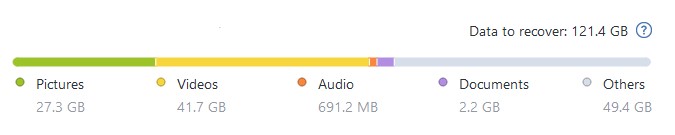
The data composition by type can be seen in this screenshot from Acronis TrueImage (VHDX files are excluded from this set; a separate test was conducted specifically for them).
We measured the following parameters:
- Full Backup Creation Time: How long it takes the program to create a full copy of the entire hard drive, including the operating system, programs, and personal files.
- Size of the Created Backup: How much space the backup takes up on the hard drive. The smaller the size, the better.
- Backup speed in file-based mode: How quickly the software handles backing up large volumes of files (e.g., photo libraries) not in disk image mode but in file-by-file backup.
Risultati dei test: cosa abbiamo scoperto nella pratica?
Backup Speed: Is There Real Performance Gain?
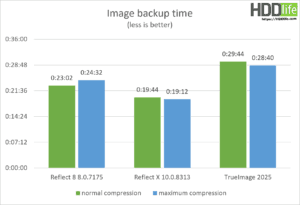
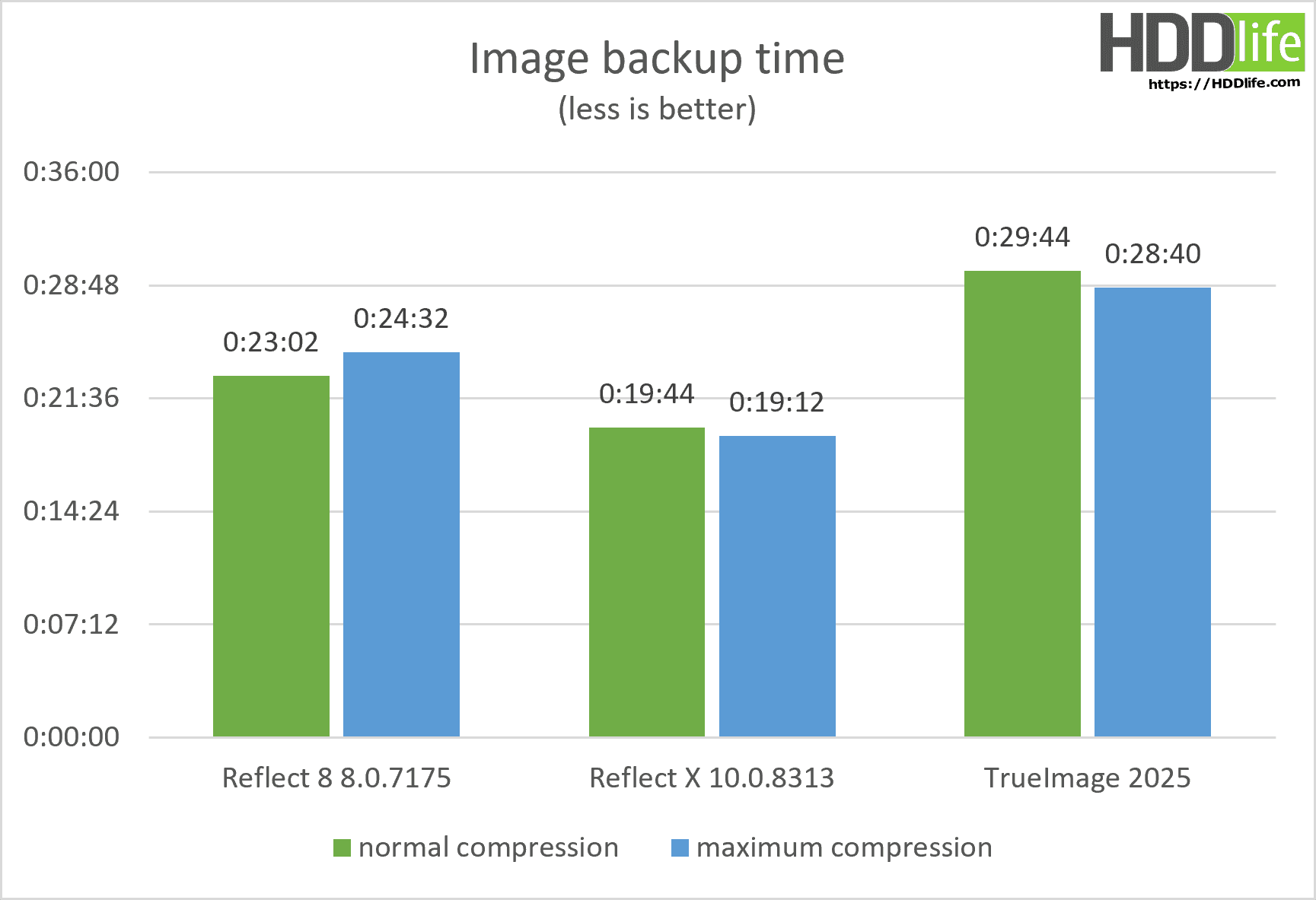
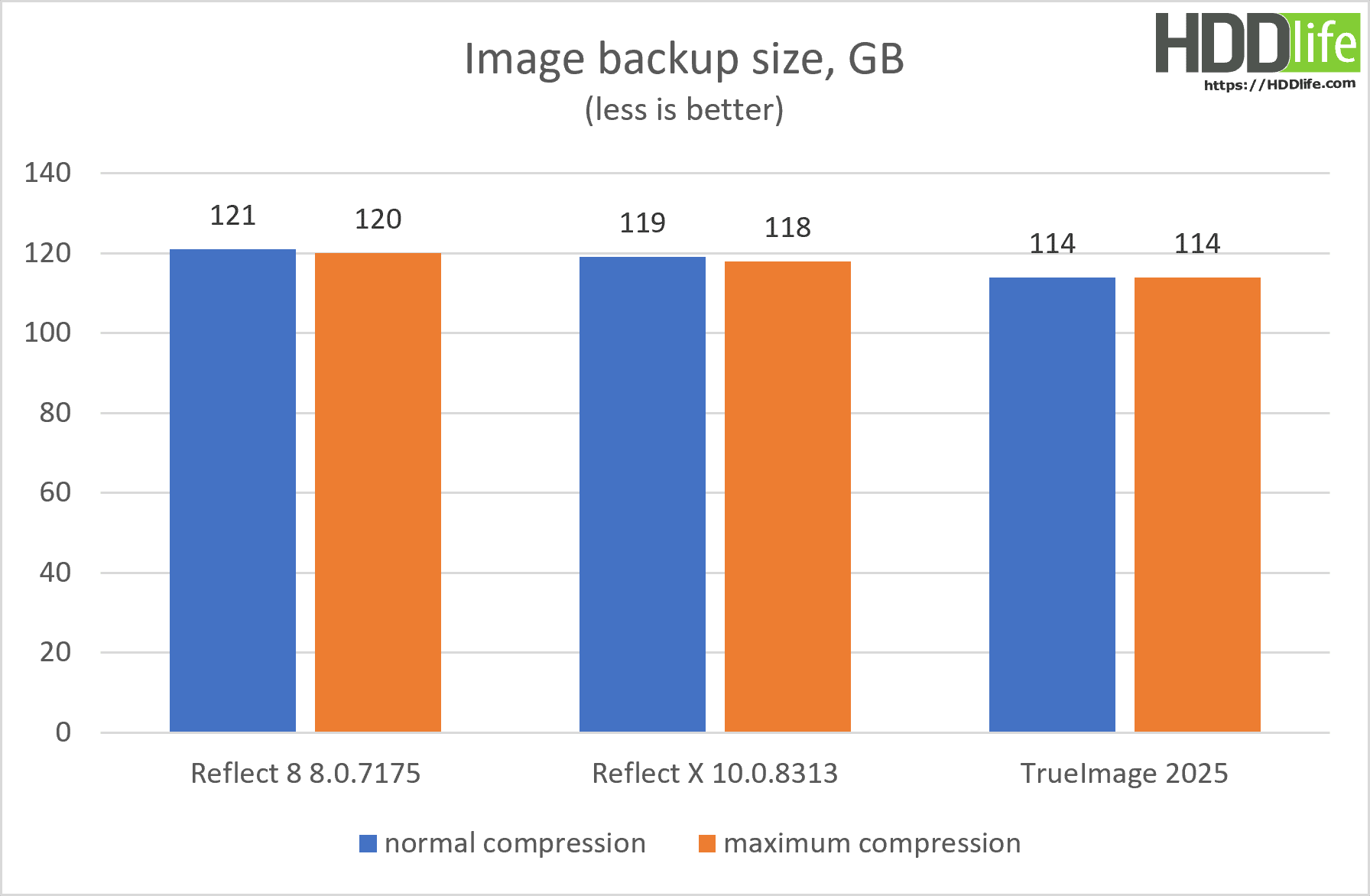
Our tests confirmed that Reflect X does create backups faster than the previous version. We didn’t see the promised doubling of speed, but on average, the backup speed increased by 20-30%. This means that the backup process takes less time, which is especially important for users with a large amount of data. Overall, Reflect X proved to be a faster and more efficient backup program than its predecessor. The speed improvement was noticeable even when backing up large amounts of data. This speaks to enhanced “backup performance.”
Comparison with Acronis True Image: Who Is Faster and More Efficient?
We also compared Reflect X with Acronis True Image, one of the most popular backup solutions on the market. The results were interesting.
In tests of full backup creation speed, Reflect X outperformed Acronis True Image. However, the difference wasn’t huge. On average, Reflect X created a backup 10-15% faster than Acronis. This indicates that both programs are reasonably well-optimized for backup speed. Reflect X showed a slight but noticeable advantage in speed.
Backup Size: Who Uses Disk Space More Economically?
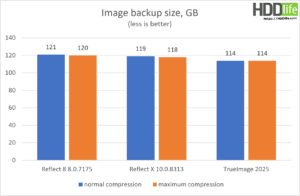
In tests of backup size, Acronis True Image showed better results than Reflect X. Acronis managed to create a backup of smaller size than Reflect X, by about 5-10%. This can be an important factor for users with limited disk space. Acronis compresses data more efficiently, resulting in a smaller backup size, which can save on “data storage” costs.
Virtual Machine Backup: Who Handles VHDX Files Better?
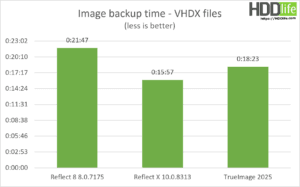
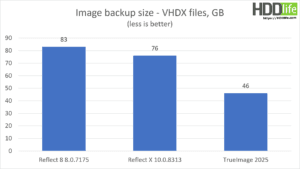
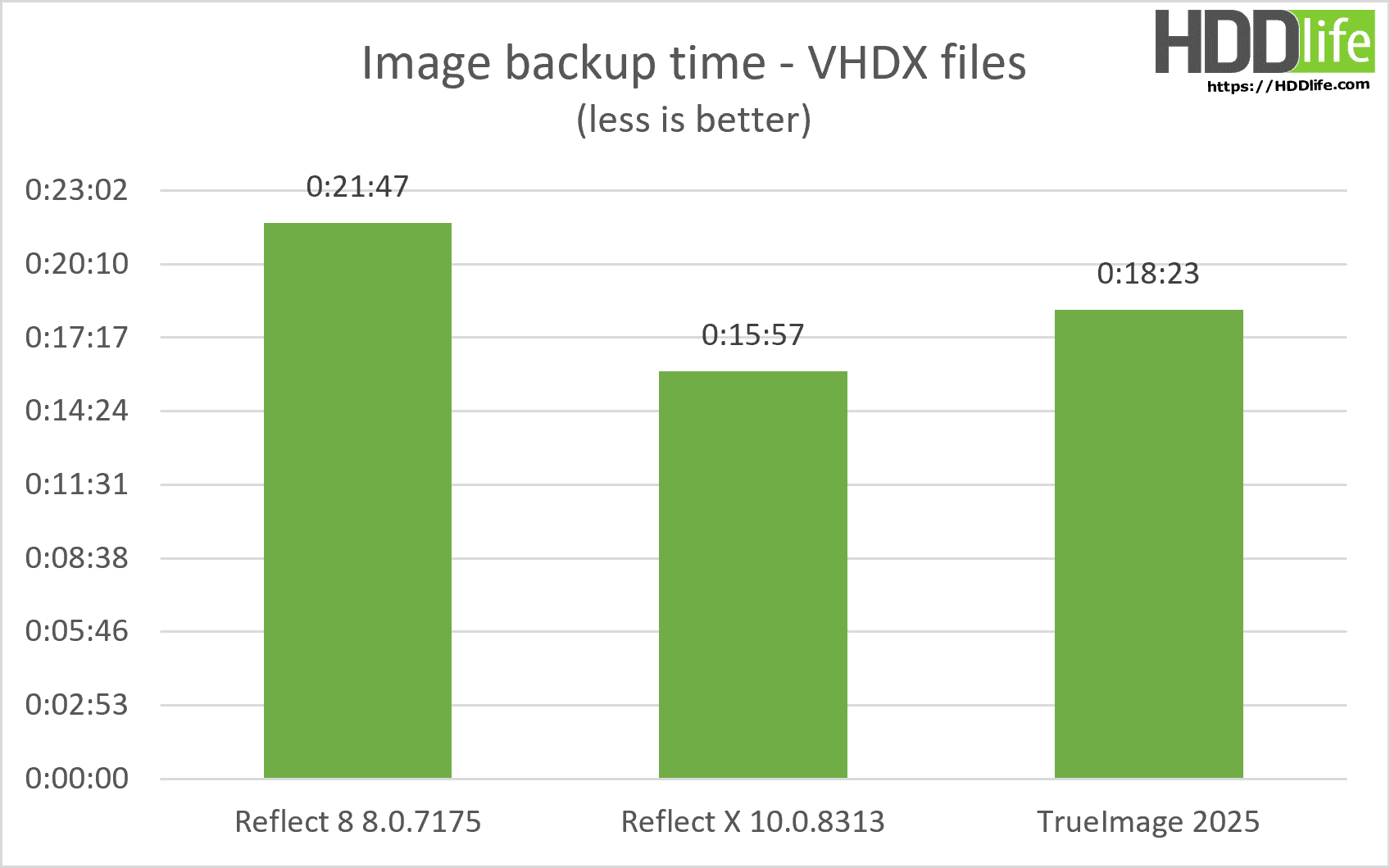
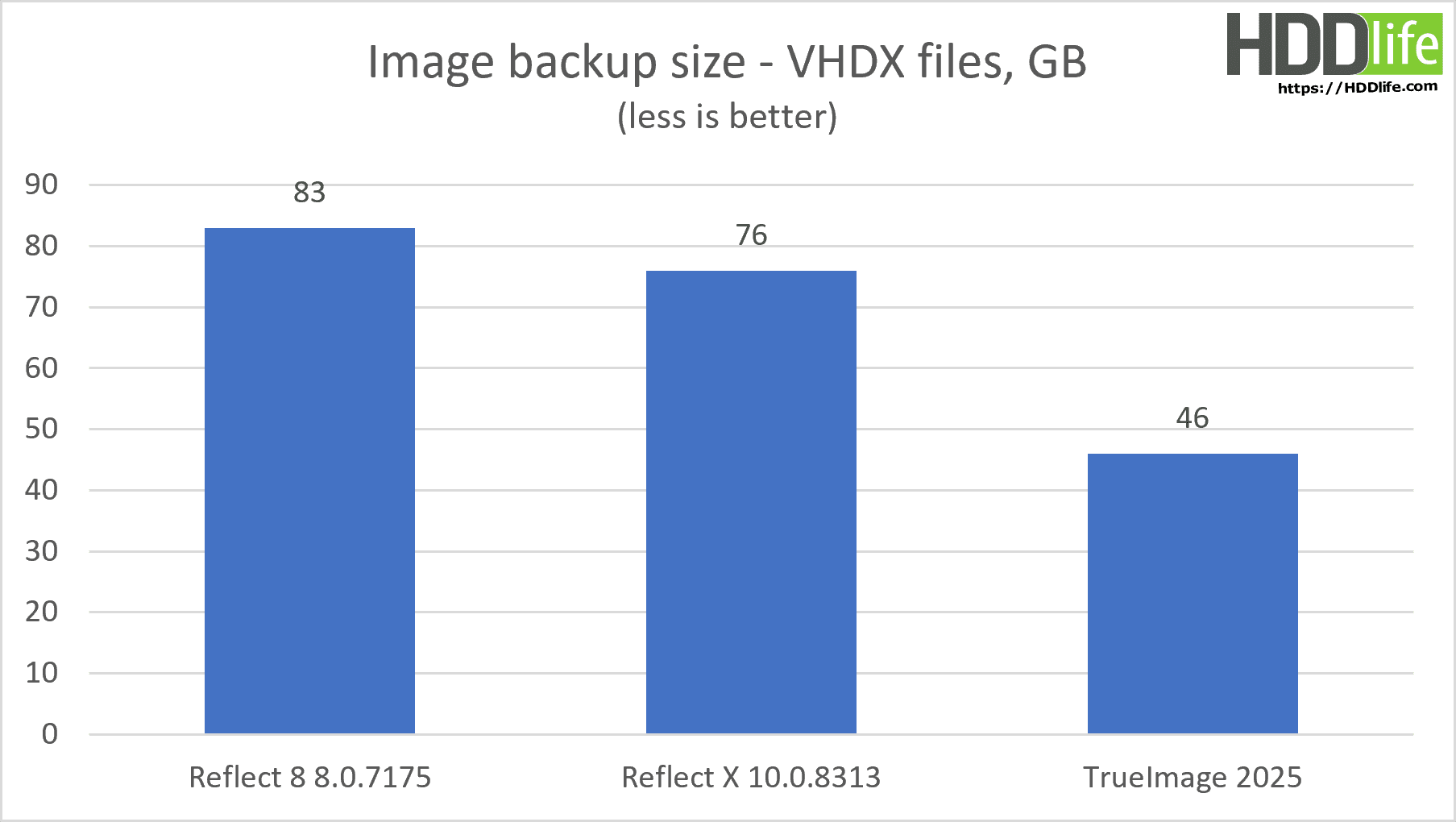
When it came to backing up virtual machines (files in VHDX format), Acronis True Image performed significantly better than Reflect X. Acronis managed to create a backup of the VHDX file of a much smaller size than Reflect X. The difference could reach 50% or more! This indicates that Acronis uses more efficient compression algorithms for virtual machine files. If you often work with virtual machines, Acronis True Image may be a better choice for you. Acronis offers significant disk space savings for virtual machine backups, enhancing “virtualization management”.
File-Based Backup Mode: Who Copies Many Files Faster?
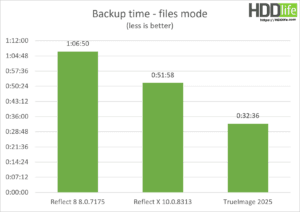
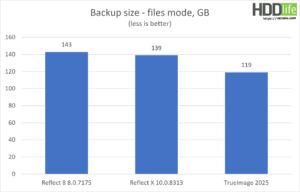
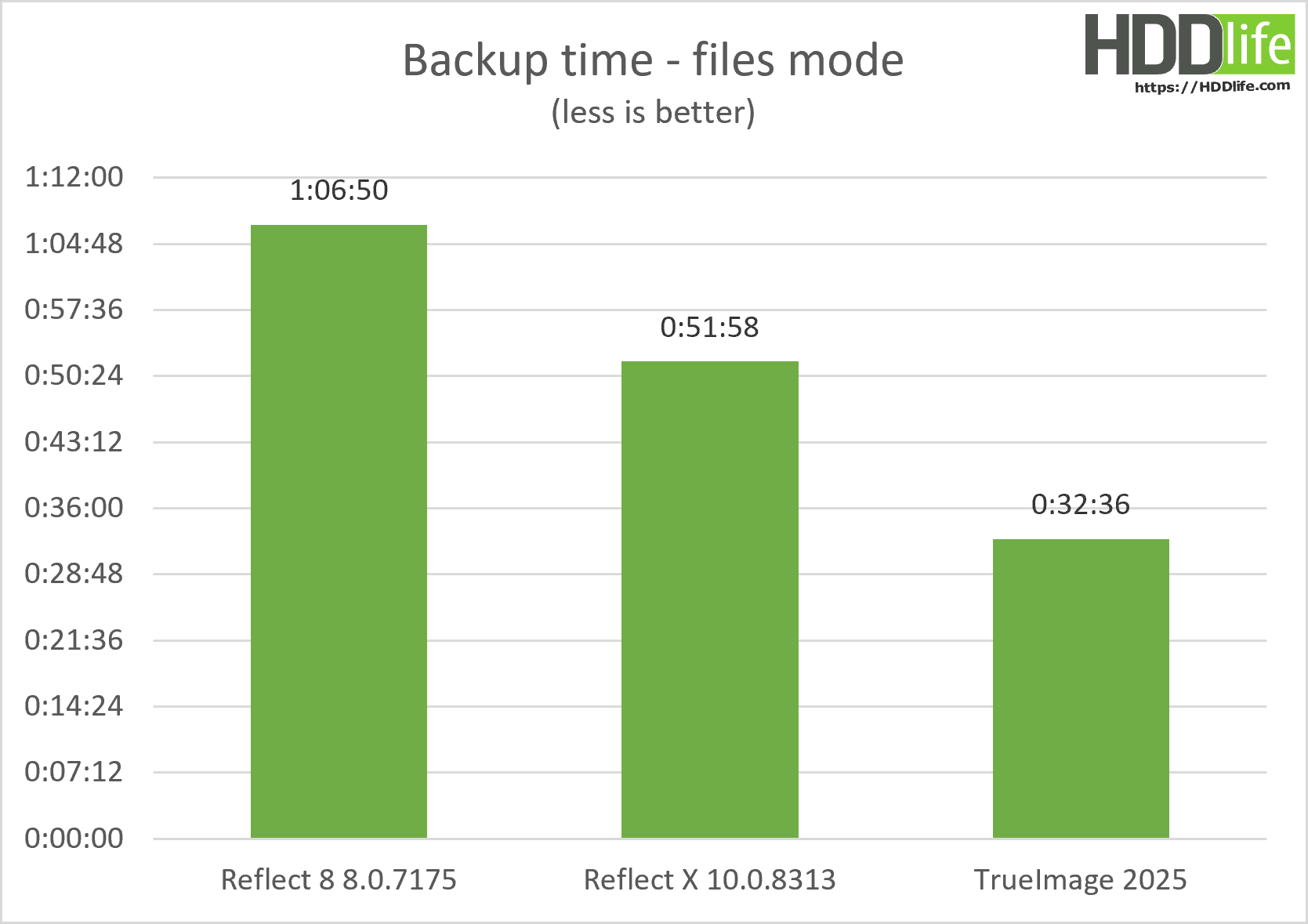
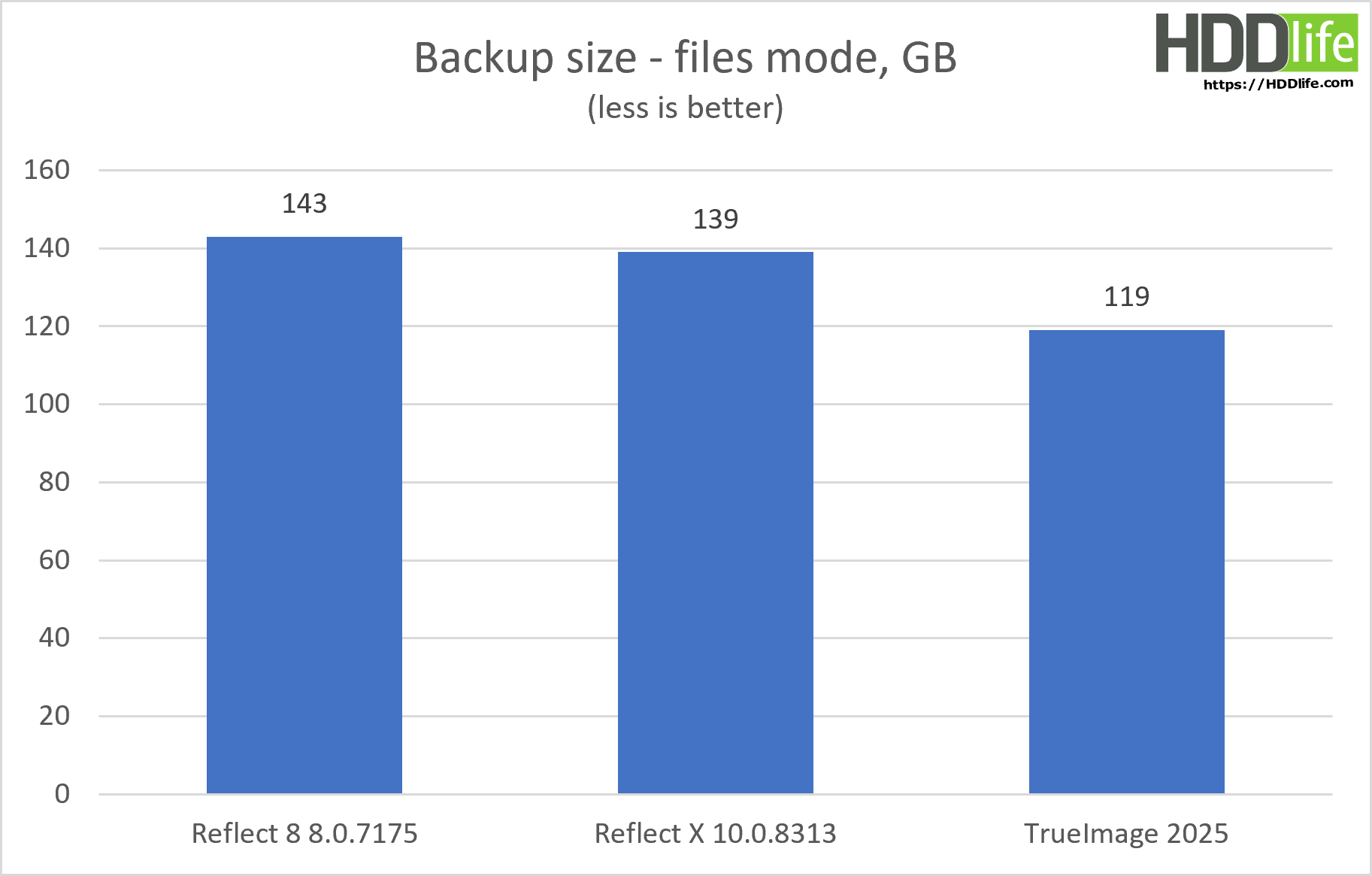
Another important difference between the programs appeared when backing up a large number of small files (e.g., photos or documents). In this test, Acronis True Image again performed better than Reflect X. Acronis managed to copy all the files much faster than Reflect X. Moreover, the size of the created archive was smaller. This indicates that Acronis handles processing a large number of small files more efficiently. If you often have to copy a large number of small files, Acronis True Image may be a more suitable solution for you. Acronis significantly outperforms Reflect X in speed and efficiency in this scenario, impacting “file system performance.”
Conclusioni e raccomandazioni
Is it true that the new version creates backups faster?
Yes, Reflect X is faster than the previous version, Reflect 8. In our small tests, it was 15 to 25% faster. While this isn’t the double speed promised by the developers, our computer is also less powerful than the one in their example. Additionally, they used SSDs for both the source data and the backup location in their tests. You can find more details about their test setup on the Macrium website. Still, even a 20% speed improvement is a significant time saving and a worthy achievement for the new version. On more modern/powerful computers, we believe the speed increase could be even greater.
Who Should Choose Reflect X and Who Should Choose Acronis?
Weighing All the Pros and Cons.
So, what did we find out in the end? Reflect X is a worthy update to the popular backup program. It’s faster, more convenient, and offers new features for protecting data. However, it’s not perfect, and it has its strengths and weaknesses.
You should choose Reflect X if:
- You need maximum speed for creating a full backup of the entire disk.
- You want to use an open data format for more flexibility and control over your data.
- You have a modern laptop or tablet based on Windows ARM.
- You’re looking for an advanced tool with a large number of settings and options.
- You primarily work with disk images rather than individual files.
You should choose Acronis True Image if:
- The small size of the backup is important to you (especially if you have limited disk space).
- You often work with virtual machines and need to efficiently copy VHDX files.
- You need a simple and intuitive interface that is easy to master.
- You often have to copy a large number of individual files.
- You need integration with cloud storage for automatic cloud backups.
Ultimately, the choice between Reflect X and Acronis True Image is a matter of your personal preferences and needs. Both programs are excellent backup solutions, but they are geared towards different use cases. Think about what’s more important to you – speed, backup size, ease of use, or virtual machine support – and make your choice.
What Else Could Be Improved in Reflect X? Our Wishes for Developers.
Despite all the improvements, there’s still room for improvement in Reflect X. We hope to see the following improvements in future versions:
- Direct support for cloud storage services such as Amazon S3, Backblaze B2, Google Cloud Storage, and Wasabi. This would allow users to create backups directly in the cloud, which would significantly improve data security and simplify the recovery process.
- Improved optimization for file-mode backup.
- More efficient compression algorithms for virtual machine files to reduce the size of backups.
In conclusion, Reflect X is an excellent choice for those looking for a fast, reliable, and feature-rich backup solution. It offers many useful features and capabilities that can help you protect your data from loss. Be sure to try the free trial to make sure this program is right for you.
Final Tip: Don’t Forget the 3-2-1 Rule! The Golden Rule of Backup.
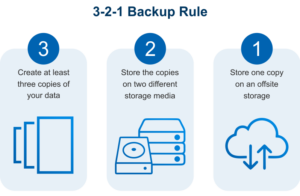
And last but not least: whatever backup tool you use, don’t forget the so-called 3-2-1 rule. This rule states:
- 3 Copies of Data: You should have at least three copies of your data: the original and two backups.
- 2 Different Media: Backups should be stored on two different types of media. For example, on the computer’s internal hard drive, on an external hard drive, and on a USB flash drive.
- 1 Copy Offsite: One of the backups should be stored in an offsite location, such as in cloud storage or on another computer on the network.
By following this simple rule, you can be sure that your data will be safe, even if the worst happens: fire, theft, or equipment failure.
Take care of your data! And don’t forget to back it up! Think of it as your “data security strategy”.
Domande frequenti
Share:
 English
 Deutsch
 Français
 Español
 Italiano
 Português
 Português do Brasil
Would be great, if you could assess restorability of backups. Historically, Acronis has been a shitshow with corrupted backups, failing restores and not booting OS restores.
What are the main new features introduced in Macrium Reflect X that distinguish it from the previous version?
1. 20% faster than the previous version (they prefer the phrasing: “dramatically enhanced backup, restore, and clone speeds” 🙂 )
2. New archive format, with documentation available.
3. Resumable Imaging: Automatically picks up interrupted backups from the last checkpoint after a network drop, write error, or system reboot rather than starting over.
4. Windows ARM support.