

SSD Health Check with HDDLife:
Wear, Temperature and Remaining Life
Most SSDs don’t beep or flash a warning before they die, so the only reliable way to know their state is to read the built-in self-diagnostics. HDDLife does that and shows the result in one window. HDDLife is an SSD health check tool that reads the S.M.A.R.T. data of your drive and estimates how much life it has left.
What an SSD health check shows
When you open HDDLife with an SSD connected, it pulls the drive’s S.M.A.R.T. attributes and translates them into a status you can act on:
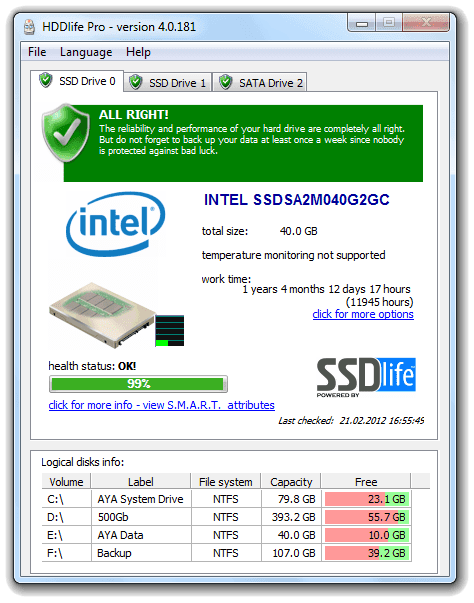
- Remaining life, based on wear data and write statistics
- Temperature, with a threshold alert if the drive runs hot
- Power-on hours, so you know the actual age of the disk
- Reallocated sectors and error counters, the first signs of failing memory cells
The status bar uses the same traffic-light scheme as the HDD side: green while everything is within range, yellow or red once the drive approaches its limits.
How HDDlife checks an SSD
HDDLife reads S.M.A.R.T. directly from the drive, without installing extra drivers. It runs in the background and updates the readings as the disk works, so you always see the current state rather than a snapshot from the last test. Two features matter most for SSDs.
JustNow calculates the remaining lifetime from the drive’s own counters as soon as you start monitoring. You don’t have to wait weeks of data collection for an estimate.
AnyWhereView lets you read the same data from another computer, useful when the drive sits in a server or a NAS that you don’t log into daily.
Temperature alerts warn you when the drive exceeds the safe working range, which matters more for drives without active cooling.
The S.M.A.R.T. numbers worth watching
Every manufacturer stores the data slightly differently, but three counters tell the real story.
Media wearout percentage (sometimes called percentage used) shows how much of the drive’s write endurance has been consumed. A new drive reads near zero, a dying one reads close to 100.
Reallocated sector count grows when the controller replaces bad memory blocks with spare ones. A stable zero is fine; a number that keeps rising means the flash is wearing out faster than normal.
Uncorrectable error count records reads or writes the controller could not fix. Any nonzero value here deserves a backup, immediately.
When to back up and replace the drive
Schedule a backup and start shopping when you see any of these:
- Remaining life under 10%
- Reallocated sectors that increase between two readings
- Temperature above the vendor’s rated maximum under ordinary load
- The OS reports the drive as unhealthy or asks you to run a scan
These signals usually appear days or weeks before actual failure, which is exactly the window monitoring is meant to open.
TBW and lifespan, in plain words
TBW, terabytes written, is the amount of data the vendor guarantees the SSD can write over its lifetime. A 512 GB consumer drive rated at 300 TBW that writes 50 GB a day would exhaust that budget in about 16 years, so for most home users the warranty limit arrives long before the flash wears out. In practice, controller electronics and firmware bugs kill drives more often than pure wear does. That’s why watching error counters and temperature tells you more than a TBW calculation alone.
Frequently Asked Questions

PROFESSIONAL
$19
Entry level for everyone
MOST POPULAR
FAMILY
$99 $65
Our most effective plan

NOTEBOOK
$25
For use on laptops

BUNDLE
$35
Desktop + Laptop
You might find these blog posts interesting:
Free HDD Health Check Software 2026 – Beat Price Surge
Free HDD Health Check Software 2026: Protect Your Data from the Price Surge If you’ve…
Macrium Reflect X vs TrueImage: HDD & SSD Backup Test Review 2026
Introduction Despite the importance of monitoring HDD and SSD health with tools like HDDLife and…
Artificial Intelligence in HDD and SSD reliability analysis: New Horizons
AI in HDD and SSD reliability analysis: New Horizons In today’s world, artificial intelligence (AI)…
Hard Drive Temperature: What Is Normal – and When Is It Dangerous?
Hard Drive Temperature: What Is Normal – and When Is It Dangerous? Studies about hard…
 English
 Deutsch
 Français
 Español
 Italiano
 Português
 Português do Brasil